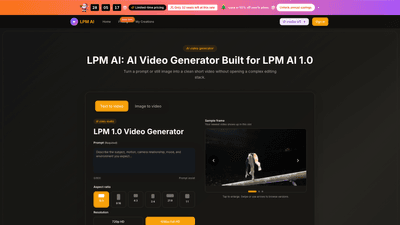
What is it
LPM AI 1.0 Video Generator is an AI-powered tool designed to turn natural-language briefs and optional still images into polished short MP4 clips for marketing, product launches, and creative reviews. Built for teams, it provides direct creative control without the friction of complex editing stacks. Users can generate text-to-video or image-to-video in a single, browser-based workspace, then brief, render, review, and revise until stakeholders sign off. The LPM AI 1.0 model focuses on clear motion, brand-safe animation, and conversion-minded outputs suitable for ads, social posts, product pages, and internal reviews. While LPM 2.0 advances motion polish, the 1.0 model remains a fast, dependable baseline for rapid testing and iteration.
Features
- Text-to-video and image-to-video in one workspace
- Create motion from plain-language prompts or from a still image, then refine in the same environment.
- Flexible motion controls
- Choose aspect ratio (e.g., 16:9, 9:16, 4:3, 1:1, etc.), duration, and look to match the brief.
- Output quality and formats
- Render in 720p HD or 1080p Full HD; optimized for social, product pages, ads, and internal review.
- Prompt assist and style controls
- Prompt guidance helps stay close to the brief; style and aspect controls let you steer pacing, mood, and camera feel.
- Brand-safe, production-ready results
- Outputs are designed for direct distribution with minimal post-editing; suitable for paid media, social, and product storytelling.
- Continuous workflow improvements
- Short, repeatable cycle: brief, render, review, and revise to speed up concept-to-share timelines.
- Outputs with professional licensing
- Commercial license included on supported plans; no watermark, even on higher-velocity outputs.
- Persistent generation history
- Track and revisit prior renders, prompts, and iterations within the workspace.
- Priority access and queue management
- Priority queue on supported plans to accelerate time-to-share during tight deadlines.
- Comprehensive plan options
- Multiple pricing tiers designed for individuals to large teams, with annual savings and seat-based incentives.
How to Use
- Start with text or an image
- Write your scene in plain language or upload a still image you want animated. The 1.0 model converts prompts, references, and style notes into a short video.
- Set motion, shape, and quality
- Select aspect ratio, duration, and the overall look. This signals to LPM AI 1.0 how the final clip should feel and how motion should unfold.
- Render, review, and iterate
-
Generate the video, preview the result, and refine the brief as needed. Repeat until the clip meets your stakeholders’ expectations, then export.
-
All rendering happens in the browser (no app installation required) and supports quick, repeatable iterations to meet tight deadlines. Exports are ready for ads, social posts, product pages, and internal review.
-
Free credits are available to start testing—use them to quickly assess how fast the LPM AI 1.0 path can turn a brief into a usable clip.
Pricing
-
Basic (Individual/Small teams)
- Price: $9.9 per month (annual plans available at 50% off)
- Credits: 9,600 credits per year (roughly 80 videos per month)
- What you get: Full LPM AI text-to-video access, full LPM AI image-to-video access, unlimited downloads, persistent generation history, prompt assist, style & aspect controls, commercial license, priority queue, no watermark, priority support
- Annual bundle perks: 800 credits per month (9,600 per year), significant savings with annual billing
-
Professional (Creators publishing multiple times per week)
- Price: $19.9 per month
- Credits: 24,000 credits per year (roughly 200 videos per month)
- Perks: All Basic features plus higher monthly credit allowance, persistent history, commercial license, priority queue, no watermark, priority support
-
Enterprise (Department-wide AI video throughput)
- Price: $49.9 per month
- Credits: 72,000 credits per year (roughly 600 videos per month)
- Perks: All Professional features, highest throughput, large-scale licensing, priority queue, no watermark, premium support
-
Limited-time incentives
- Limited seats: 32 discounted seats left at the 50% annual rate
- Annual Save: 50% off yearly plans; promotional period with “OFFER CLOCK” and “Flash Sale 50%”
- Note: You can start with complimentary credits to test the workflow before committing
-
How credits map to usage
- Credits are consumed per video render based on length, resolution, and feature usage. Plans provide monthly/yearly credit allocations aligned with expected output volume.
Tips
- Start with concise prompts
- Write scenes in plain language and keep prompts close to the brief to improve first-pass accuracy.
- Use text and image workflows together
- Leverage both prompts and reference images to anchor branding, layout, and motion direction.
- Apply consistent style and aspect controls
- Use the provided style presets and aspect ratio options to maintain brand consistency across clips.
- Iterate efficiently
- Use the quick render-preview loop to test multiple directions (tone, pacing, camera feel) before committing to a final version.
- Leverage brand anchors
- Reference packaging, characters, and layouts to anchor motion in a recognizable brand guide.
- Plan for distribution
- Design with the end platform in mind (ads, social, product pages) to minimize post-production and re-edits.
- Test early concept directions
- Use LPM AI 1.0 to explore scenes and campaign directions without risking production spend.
- Review and approve faster
- The platform is built to accelerate briefing-to-approval cycles, reducing the back-and-forth of traditional edits.
Frequently Asked Questions
-
What is LPM AI?
- LPM AI is an AI video generator that converts natural-language briefs and optional still images into short MP4 clips tailored for marketing, comms, and creative review.
-
How is LPM AI different from a stock library?
- You control every frame with prompts and references, so the output follows your narrative instead of a generic template.
-
How do renders actually run?
- Submit text or imagery, choose technical settings, queue a job, view a preview, adjust the brief, and regenerate until stakeholders sign off.
-
Where does the LPM 1.0 Model show up today?
- LPM AI 1.0 and the LPM 1.0 Model family underpin dependable baseline generations. LPM 2.0 AI focuses on smoother motion, better prompt adherence, and fewer artifacts.
-
Is image-to-video supported?
- Yes. Upload a still, describe the motion you want, and the engine animates while respecting the original composition.
-
Do I install an app?
- No. LPM AI runs in the browser on desktop or mobile—no separate download required.
-
What export controls exist?
- Before rendering, you select duration, aspect ratio, and resolution tier; you can download the finished file when processing completes.
-
What is the typical turnaround time?
- Most clips finish within minutes, though complex prompts, longer durations, and peak traffic can extend waits.
-
How do I start testing?
- Start with free credits to see how quickly LPM AI moves from prompt to usable clip.
-
Is there a free trial or credits to begin?
- Yes, you can begin with complimentary credits to evaluate speed and result quality before purchasing.
-
How do I cancel or manage pricing?
- Plans are cancellable via the platform; for assistance, contact support at support@lpmai.art.
-
Where can I learn more or get support?
- Support is available via email at support@lpmai.art; the platform also offers in-product guidance and tutorials.
This product overview highlights LPM AI 1.0 Video Generator as a fast, conversion-focused AI video solution that gives teams direct control over motion, branding, and distribution-ready outputs. With multiple pricing tiers, annual savings, and a browser-based workflow, it enables rapid concept-to-share cycles for ads, social content, product storytelling, and internal reviews.